

Rent out your stuff
Make Money From Things You Already Own
List items you already own and rent them out by the day. You set the price, the dates and how the handover works. Creating a listing is free.
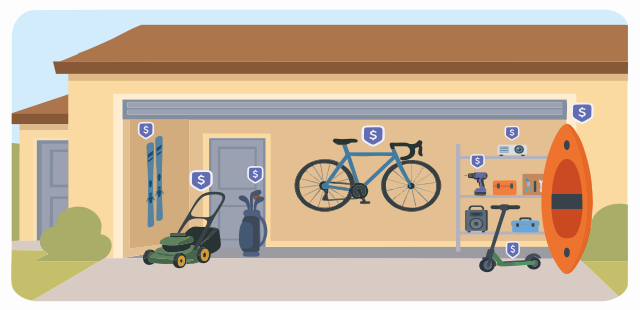
What could you rent out?
Ideas for things you may already own. These are examples of what can be listed, not items currently available.

Tools and equipment

Electronics

Cameras and audio

Party and event equipment

Outdoor and recreational gear

Compliant e-bikes and scooters
See what can and cannot be listed
Looking for ideas of what to list? See best things to rent out.
How earning with Super Neighbor works
From listing an item you own to getting paid after it comes back.

1. List your items
Add photos, a daily price and the dates it is available. Choose pickup only, pickup or delivery, or delivery only. Listing is free. A new listing is reviewed before it appears, and it stays unpublished until lender verification is complete.

2. Approve requests
Renters send a request. You accept or decline each one. They pay through Super Neighbor only after you accept.

3. Coordinate handover
Agree on pickup or delivery in chat. Super Neighbor does not deliver the item. If delivery is requested, set the fee in chat before you accept. $0 is allowed.

4. Get paid & reviewed
After the return is confirmed, earnings are added to your platform balance about 24 hours after the rental end date. A 10% fee applies to the rental amount.
You stay in control
The listing, the calendar and each request stay with you.
Your price
Set a daily price of at least CAD $1. You can also add a lower daily rate for 3+ days and for 7+ days. Those rates cannot be higher than the base daily price.
Your calendar
Block dates when the item is not available, and pause the listing when you do not want new requests.
Pickup or delivery
Choose pickup only, pickup or delivery, or delivery only. Super Neighbor does not provide the delivery.
The delivery fee
If a renter asks for delivery, agree the fee in chat before you accept. $0 is allowed, up to CAD $500. Accept stays blocked until that fee is set.
Each request
Accept or decline every request. The renter pays through the platform only after you accept.
A security hold you choose
Set a security hold on the listing, between CAD $100 and CAD $400. It is a temporary authorization on the renter's card before handover, not a charge and not part of your earnings. It is released if the item is returned as agreed.
What you keep on a rental
An example of how the lender fee is calculated. It is not a forecast of what an item will earn.
- $20/day × 3 days
- $60
- 10% lender fee
- $6
- You earn
- $54
Withdrawal fees can apply. No rental or income is guaranteed.
Why rent out what you already own
The item stays yours
You rent it out for the days you choose. When the rental ends, it comes back to you.
You decide when it goes out
Your calendar, your pause switch and each accept or decline stay in your hands.
You pay only when it rents
Creating an account and listing items is free. The 10% lender fee applies when a rental is confirmed.
If you live in Toronto or the GTA, see how to make extra money in Toronto with things you already own.
What is in place for a rental
What already happens around a rental, from the request to the return.
Renters verify before they request
A renter verifies their identity and phone number before they can send a rental request.
Payment goes through the platform
After you approve a request, the renter pays through Super Neighbor. Payments are processed by a third-party payment provider.
A security hold on the renter's card
You choose an amount between CAD $100 and CAD $400. It is an authorization placed before handover and released if the item is returned as agreed.
Handover and return are confirmed
Renter and lender confirm the handover and the return in the app. Photos or video can be uploaded around the rental.
A way to report an issue
Open the rental details and select Report a rental issue, or use Help & Support.
Questions about listing your items
Yes. Creating an account and listing items is free. A 10% lender fee applies when a rental is confirmed. Renters pay their own 20% service fee, with a minimum of CAD $2. Fees are shown before the rental is confirmed.
You keep the rental amount minus the 10% lender fee. That net amount is credited to your platform balance. A delivery fee you agree in chat is included in the amount the 10% is calculated on.
Earnings are added to your platform balance about 24 hours after the rental end date, once the return is confirmed. You can withdraw available funds to an approved payout method. The minimum withdrawal is CAD $10. The withdrawal fee is 0.25% + CAD $0.25, deducted from the amount you request. A bank account is needed to withdraw, not to publish a listing.
No. A listing can be pickup only, pickup or delivery, or delivery only. Super Neighbor does not deliver items. If you offer delivery and a renter requests it, agree the fee in chat before you accept. $0 is allowed.
A temporary authorization on the renter's card, placed before handover. You set it on the listing, between CAD $100 and CAD $400. It is not a charge, and it is not part of your earnings. It is released if the item is returned as agreed. The amount is frozen when the rental request is created.
Super Neighbor does not currently provide insurance for renters or lenders. The security hold and the claim process are not insurance. Submitting a claim does not guarantee a reimbursement. Details are in the Terms of Service.
Super Neighbor is currently focused on Ontario, starting with Toronto and the GTA. Availability in other provinces may be limited as we expand.
Ready to list something you already own?
Set your price, your dates and your handover option. Listing is free.
List an itemLooking to rent something instead?